A holiday order deadline post should tell an Instagram shopper what must happen, by which date and for which products. Put that information before the seasonal greeting. An order cutoff is your shop’s operational limit; it is not automatically a promise that a parcel will arrive before a holiday.
Use your real capacity and current delivery information to prepare the notice. This guide does not supply carrier deadlines or recommend a universal cutoff. The print-shop example is fictional, and its dates must come from the business using it rather than from an online caption collection.
Separate Your Holiday Order Deadline from Shipping Dates
Start with the action the customer needs to complete. Does the cutoff apply to submitting an inquiry, approving a design, completing checkout or collecting an order? Those actions are different. A request received on time may still need review before the work can be accepted.
Name the product group too. Ready-made prints, personalized stationery and local pickup may have different arrangements. If only one category is closing, do not write “all orders close” just because that line fits neatly on a graphic.
For a fictional print shop, a useful working note might say that personalized requests need an earlier review window than ready-made prints. The owner would then check the actual production schedule before choosing dates. The notice should reflect that distinction without pretending an inquiry is already an accepted commission.
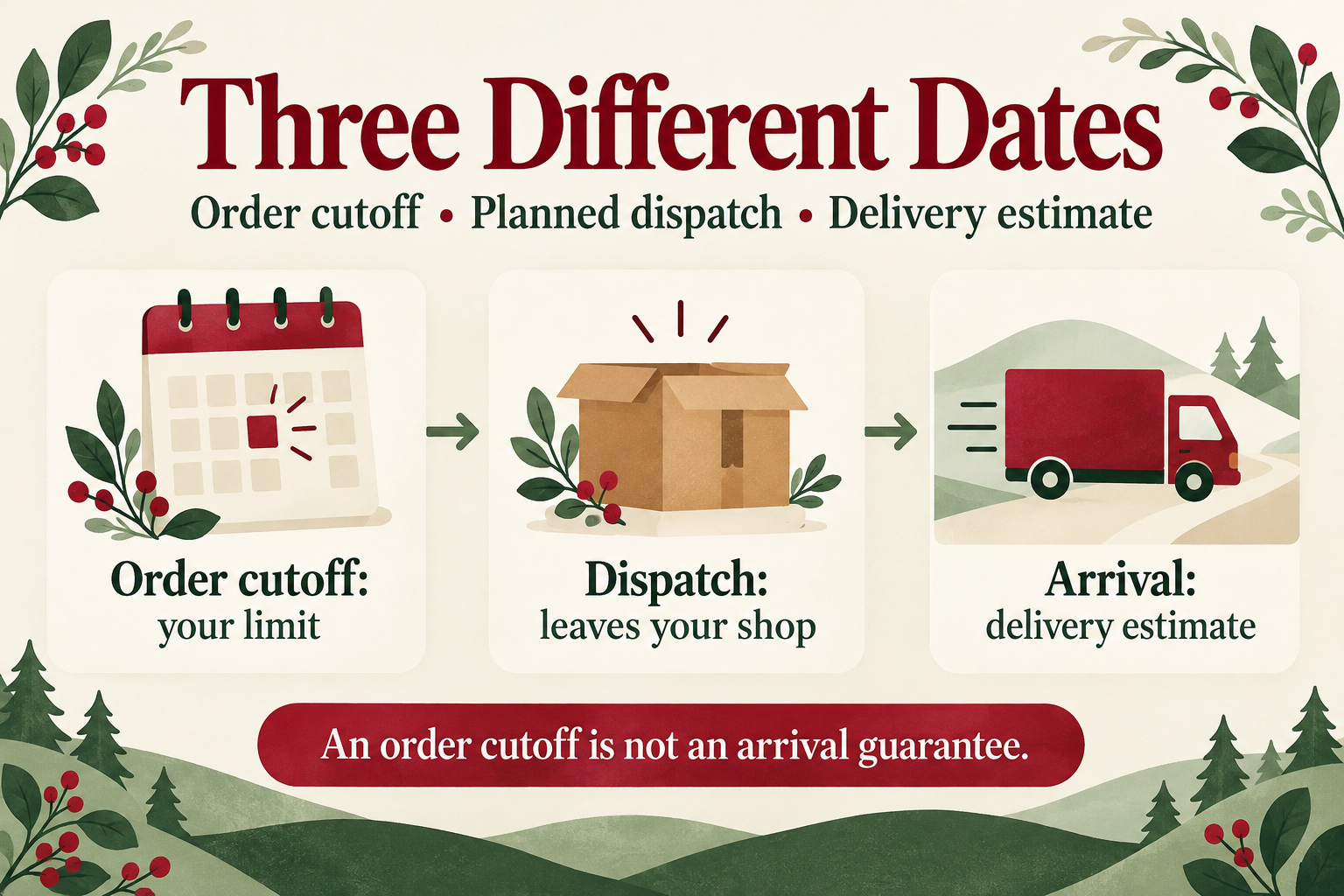
Keep three concepts separate: the last action your shop can accept, the date you plan to dispatch, and the carrier’s estimated arrival window. “Ships by Friday” says when the parcel leaves you; “arrives by Friday” makes a different claim. Do not swap them to make the wording shorter.
Check the current carrier guidance that applies to the destination and service you actually offer. Do not borrow a cutoff for another country or assume last year’s calendar applies. If arrival is an estimate, label it as one and avoid presenting uncertain delivery as guaranteed.
For gifts collected locally, shipping information may be irrelevant. Explain the actual pickup arrangement instead, including the location information a customer genuinely needs and where to confirm it. Our home-baker bio guide offers a related example of making a local order route understandable without crowding every detail into a profile.
Write the Holiday Order Deadline Post in Plain Language
Lead with the product group and required action, followed by a complete date and any relevant time zone. A specific date stays clearer than “this Friday” when the post is shared later. If a closing time matters, write it explicitly and make sure your checkout or inquiry process follows the same rule.
A fictional draft might read: “Personalized print inquiries for the holiday period close on [full date, time and time zone]. Requests are reviewed before acceptance. Ready-made prints follow the current availability and dispatch information on their product pages.” Replace the brackets and category wording with the actual arrangements before posting.
Preview’s business-caption guide discusses seasonal captions and calls to action. Use that writing context to make the invitation clear, while keeping the operational dates factual. A playful seasonal line can follow the essential notice; it should not replace it.
If you show a product beside the notice, its caption should still describe the real offer. The handmade-jewelry caption guide provides related product-copy examples, including the need to verify gifting and availability details.
Update the Holiday Order Notice When Options Change
When a cutoff passes, make the current position easy to understand. Explain which requests have closed and whether any real alternatives remain. Do not advertise gift cards, ready-made stock or pickup as a fallback unless you actually offer those options now.
Avoid creating pressure with invented quantities or a countdown that resets. If capacity changes, say what changed and correct the relevant information. A clear update is more useful than leaving an expired “last chance” announcement to circulate without context.
Preview’s guide to choosing a clear caption message is helpful when a notice is trying to do too much. Separate an order update from a product story if they require different explanations. Neither post needs a claim about urgency or sales performance to be useful.
Check the Buyer’s Route Before Sharing the Post
Read the graphic, caption and destination as one set of instructions. Do the product categories match? Is the year correct? Does the linked page still accept something the post says is closed? A clear caption cannot fix a contradictory checkout page.
Open the route on a phone, including the last step you are asking the shopper to take. Related reading: the multiple-bio-links guide can help you distinguish current stock from seasonal inquiry information. Use accurate labels and keep them updated as the holiday window changes.